Note You are reading Bitloom's documentation in Yocto-docs mode : same words, the look of the Sphinx and Read the Docs pages Yocto developers know by heart. A friendly tribute, not affiliated with the Yocto Project. Back to the Bitloom look .
Keyboard reference
Bitloom is fully usable without a mouse. Section keys work while a table, tree or log has focus; typing in a field never triggers them.
Everywhere#
Key
Action
1…9, 0Jump to a section (also Alt+number)
[ / ] F8 / F9Previous / next section
Tab / Shift+TabMove focus between fields, tables and logs
/ or Ctrl+WFocus the filter or search field of this section (nano: Where Is)
EscLeave a field and return to the section list
EnterOpen / select the highlighted row; run from a field
↑ ↓ j / kMove down / up in tables, trees and logs
Ctrl+Y / Ctrl+VPage up / page down (nano)
tEdit the build target (when no section uses t)
↓ (in the target field)List the image recipes found in the project; type to filter, Enter picks. → accepts the inline suggestion. Same in the web dashboard.
bBuild the target (outside Recipes)
PSwitch profile
F2Command center (every operation, filtered as you type)
F3Refresh metadata, logs and diagnostics
F4Edit profiles
F5 / F6Stop / retry the selected job
F7Themes
F10Developer workbench
Ctrl+LSearch the build log
Ctrl+PCommand palette: sections, actions, operations
? F1 Ctrl+GThis keyboard reference (nano: Get Help)
Ctrl+Q / Ctrl+XDetach (service keeps running) / exit
1 · Builds#
Key
Action
sStop
rRetry
eErrors
pPause
xExport
iSummary
dCompare
fFailed log
cConsole builds
2 · Recipes#
Key
Action
bBuild
mModify
lLayers
nNew file
oOpen
tTree
cStudio
3 · Task logs#
Key
Action
oOpen
fFailed log
4 · Environment#
Key
Action
tEnv/graph
lLoad
rResolve
dDiff
gGraph
wWhy
hHistory
aAudit
oReport
mTimings
5 · Caches#
Key
Action
sScan
tDL/sstate
pPrune plan
aFetch all
wtmp/work usage
6 · Artifacts#
Key
Action
oOpen
iRootfs
mImage matrix
sSBOM quality
vVulnerabilities
7 · Analysis#
Key
Action
tType
aAnalyze
xExport
8 · Developer#
Key
Action
vView
iInspect
oOpen
uOperation
rRun
cCapture
dCompare
nNew layer
lClone
hDevices
9 · Configuration#
Key
Action
wProjects
oNotifications
sSBOM settings
cCRA readiness
llocal.conf
ybblayers
ebitbake -e
ddevtool
vVersions
nNetwork
0 · Help#
Key
Action
cCustomise keys
Dialogs#
Key
Action
Esc / Ctrl+XClose or cancel the dialog; in editors ^X asks before discarding changes
Ctrl+OWrite out: save files and profiles, confirm forms (Ctrl+S also works)
Ctrl+AGuided setup: save every product of a launcher script as its own profile
Ctrl+W / Alt+WEditors: where is (search) / find next
Ctrl+K / Ctrl+UEditors: cut the current line / uncut (paste)
Ctrl+GKeyboard reference
EnterCommand center: queue the selected operation
↑ / ↓Command center filter: choose the operation
f / g / kInterruption dialog: finish, graceful stop, force
Your own keys#
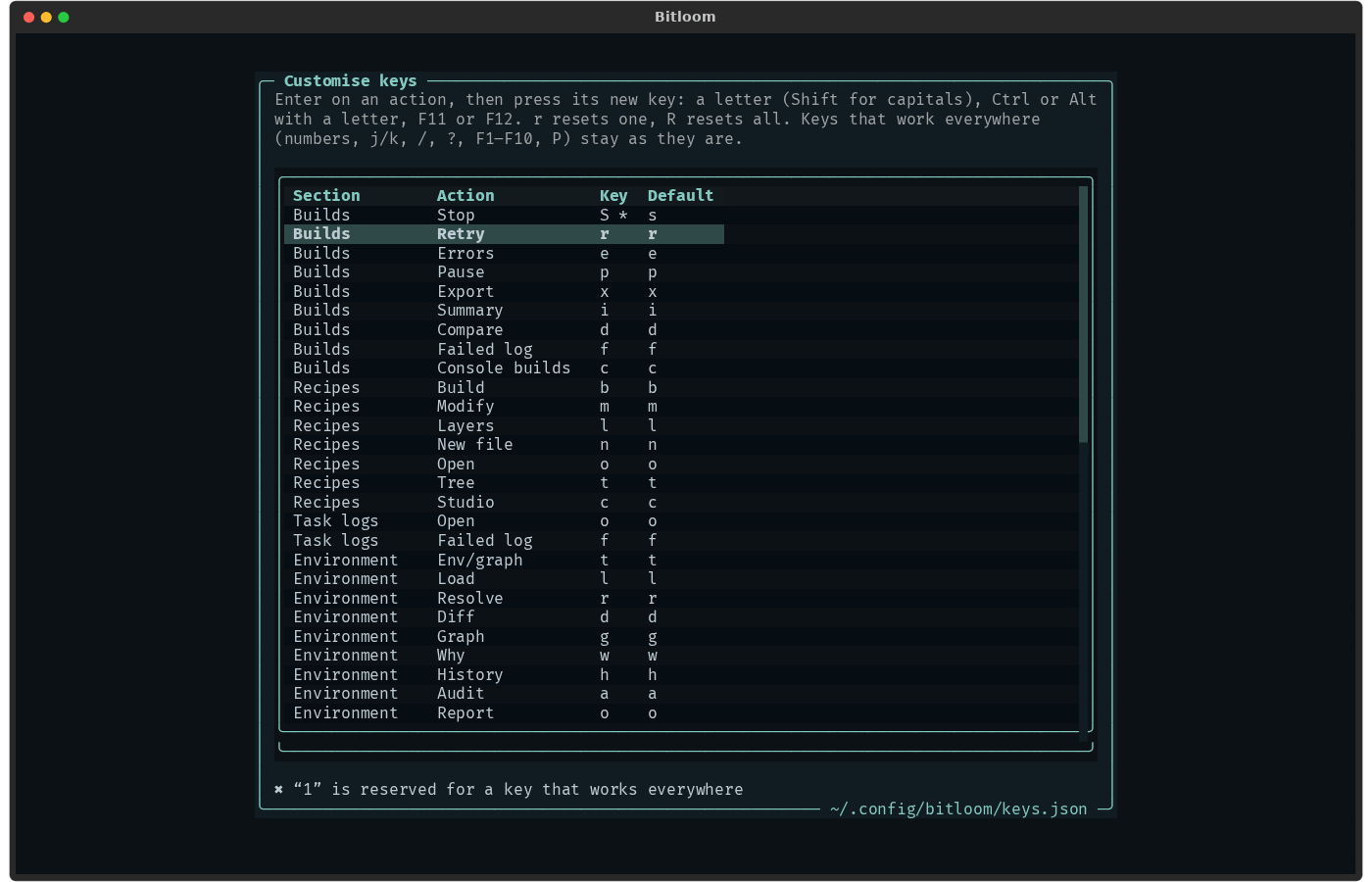
Every key in the section tables above can be changed. In the TUI open Help (0) → c (or Ctrl+P → Customise keys ), select an action, press Enter, then the new key: a letter (Shift for capitals), Ctrl or Alt with a letter, F11 or F12. r resets one, R resets all. Bitloom refuses a key that another action of the same section already uses, and the keys that work everywhere (numbers, j/k, /, ?, [/], P, F1–F10, the nano Ctrl keys). The new keys apply from the next start (Ctrl+Q detaches; builds keep running); buttons, the footer and ? show them.
They are saved in ~/.config/bitloom/keys.json (or the file named by BITLOOM_KEYS), which you can also edit or share:
{"builds": {"Stop": "S", "Retry": "ctrl+r"}, "analysis": {"Analyze": "A"}}
bitloom --keys prints the keys in use and why any were refused (exit status 1 when one was); the TUI says it at start.
Screenshot Customise keys: Stop moved to S, a reserved key refused
 Bitloom docs