 Bitloom docs
User guide
For a complete hands-on acceptance path, follow the manual testbook. The Developer workbench guide documents F10, all sixteen implemented views, creation/clone workflows and evidence comparisons. The research and implementation map retains sources and practical boundaries.
More guides:
- Keyboard reference: every key in every section, nano editor keys and dialogs.
- Web dashboard:
bitloom --web, sections, notifications, keyboard and API. - Projects and guided setup: open folders with automatic detection (kas files, launcher scripts, Poky checkouts), create new projects, clone from Git.
- SBOM, CRA and Yocto releases: release awareness, SBOM quality, vulnerabilities (cve-check, sbom-cve-check, Grype), CRA readiness, EN 40000 and SBOM settings.
- Studio: create your own distribution, machines, images, recipes and layers.
- Daily helpers: build notifications, ETA, comparison with the previous run, tmp/work usage.
- CI and build servers: headless CI runs, the build service as a system service, team profiles, NFS and setup checks, image matrix, device fleet, console builds and project launcher scripts.
What Bitloom covers#
| Area | Capabilities |
|---|---|
| Builds | Independent reconnectable build service, serial queue, persistent SQLite history, streaming logs, observed live recipe tasks, task progress, exit status, retries with original profile, cancellation, SDK/eSDK, recipe tasks, forced compile, dry runs, parsing |
| Runtimes | Initialized host environment; kas config composition; fresh Docker/Podman containers; existing containers; official kas-container wrapper |
| Layers | Expandable layer tree, search local layers, priorities through BitBake, add/remove/create, overlays, appends, cross-layer dependencies, edit metadata with backups |
| Recipes | Browse .bb, .bbappend, .bbclass and kas YAML, compile/patch/package individual recipes, list tasks, evaluate environment |
| Development | devtool modify/add/build/build-image/reset/finish/update/upgrade, upstream version checks, device deployment, devshell, kernel menuconfig, savedefconfig and config checks, U-Boot menuconfig and diffconfig |
| Errors and logs | Build and task log browsers, case-insensitive search with context, error-only view, pause/resume, failure notifications, exports, build summary and timestamped slow-task reports |
| Downloads | Fetch a recipe or all target dependencies, size/age inventory, orphan marker and partial-download audit, concrete prune plans |
| Shared state | Local inventory, age-based prune plans, recipe cleansstate, signature dumps/diffs, -S printdiff |
| Analysis | Runtime file/directory access and backed-up editing, binary artifact export with SHA-256 verification, failure diagnosis, image package/file provenance, preflight, snapshots and comparison, reproducibility bundles, conservative signature-reference cache plans; search metadata contents with file/line locations, compare package manifests by architecture, inspect sstate hit rates, group repeated warnings, export reports |
| Workbench | Filter evaluated environment variables, compare two snapshots, browse generated dependency edges and transitive/reverse dependency context, buildhistory Git diff |
| Outputs | Discover images, SDKs, manifests, licenses, SBOMs, buildstats and buildhistory files; text preview, read-only tar rootfs inventory (permissions, owners, links), and binary artifact paths |
| Configuration | Multiple named profiles, custom environment/runtime arguments, local.conf and bblayers.conf editor, backups, external-change detection, diagnostics |
| Releases | Local branch/revision/tag report, dirty-tree status and literal layer-series compatibility checks; separate profiles and build directories per release |
| Testing and security | testimage, ptest, CVE and SPDX command entry points when the required classes/configuration exist |
| Utilities | Argument-based custom commands, interactive terminal handoff, command filtering, keyboard shortcuts, command palette, CLI diagnostics |
The command reference documents every built-in action.
Install from a GitHub release#
Open the GitHub Releases page and download the assets for the version you want. Replace 1.2.3 below with that version.
Debian / Ubuntu#
Download bitloom_1.2.3_all.deb, then install it from the download directory:
sudo apt install ./bitloom_1.2.3_all.deb
bitloom --demo
Requires Python 3.10+ on Debian/Ubuntu. Python application dependencies are included under /opt/bitloom/lib; no pip installation is needed. Docker, Podman, kas and Yocto remain separate tools for real builds. Remove Bitloom with sudo apt remove bitloom.
Other Linux distributions / WSL2#
Download bitloom-1.2.3.tar.gz and install in a virtual environment:
tar -xzf bitloom-1.2.3.tar.gz
cd bitloom-1.2.3
python3 -m venv .venv
.venv/bin/python -m pip install .
.venv/bin/bitloom --demo
Alternatively, install the release wheel with .venv/bin/python -m pip install /path/to/bitloom-1.2.3-py3-none-any.whl. Source and wheel installation require Python 3.10+, venv support and internet access to install dependencies. WSL users should install inside their Linux distribution.
One file: bitloom.pyz#
bitloom-1.2.3.pyz is Bitloom and its dependencies in a single file (pure Python, about 3 MB). It needs nothing but Python 3.10 or newer: no installation, no virtual environment, no root.
python3 bitloom-1.2.3.pyz --web # or: chmod +x bitloom-1.2.3.pyz && ./bitloom-1.2.3.pyz
It is the way to put Bitloom inside a build container without rebuilding the image (mount it, or COPY it in a Dockerfile): see Where your build runs.
Verify downloaded assets#
Download SHA256SUMS alongside the packages, then run sha256sum --check --ignore-missing SHA256SUMS in the same directory. Check that the package you downloaded reports OK.
bitloom --version prints the installed version. Every release also carries bitloom-1.2.3.spdx.json, an SPDX 2.3 SBOM of what the packages contain: Bitloom and each bundled Python package (Textual, Rich and their dependencies) with its version, SPDX licence identifier and package URL. The Debian package installs the same file as /usr/share/doc/bitloom/sbom.spdx.json, for the software inventory of the machines you install it on.
How releases are made#
Releases are cut with Actions → Release Bitloom → Run workflow and a version such as 1.2.3. The workflow refuses versions that already have a tag, and stable releases from any branch other than main (tick pre-release to publish from another branch). It runs the test suite, builds the source archive, wheel, Debian package, SBOM and SHA256SUMS, installs the .deb on a clean runner and checks bitloom --version, the bundled SBOM and a smoke run, keeps the assets with the workflow run, then commits the version into pyproject.toml and bitloom/__init__.py on a release commit, tags it v1.2.3 and publishes the GitHub release from that tag with generated notes. The release commit is reachable only from its tag: main keeps the development version.
Build the same assets locally with python tools/build_release.py 1.2.3 --output dist/release (needs build, wheel and dpkg-deb).
Fresh checkout demo#
Run ./setup-demo.sh from the cloned checkout to create or reuse .venv, install dependencies and launch the sample TUI. Requires Bash, Python 3.10+ with venv support on Linux or WSL2, and internet access for installation. No Docker, kas or Yocto installation is needed for the sample data.
Use ./setup-demo.sh --no-launch to prepare without launching, then .venv/bin/bitloom --demo to start later. --dev installs test dependencies; --python python3.12 or PYTHON selects the interpreter for a new environment. The script also works when invoked from another directory. All demo data stays under .bitloom in the checkout.
The demo has three profiles; press P to switch:
| Profile | Workspace | Shows |
|---|---|---|
demo |
.bitloom/demo |
Generic sample: recipes, a failing task log, a console build, caches |
demo-scarthgap |
.bitloom/demo-scarthgap |
Poky layout detected as 5.0 LTS, SPDX 2.2 SBOM, cve-check summary; Wrynose-only operations are explained and refused |
demo-wrynose |
.bitloom/demo-wrynose |
Split OE-Core layout detected as 6.0 LTS, SPDX 3 SBOM with VEX, sbom-cve-check report |
Every sample file is labelled; the demo never simulates a successful Yocto build.
The terminal adapts while resizing: below 105 columns or 30 rows it hides the navigator and side panes; below 30 rows it also hides the overview. Below 75 columns or 22 rows it hides history and metrics to preserve output. Resize to restore panels. F8/F9 switches sections and F2/F4/F7 opens commands/profiles/themes even when toolbar controls are hidden. Verified sizes range from 60 × 20 to 160 × 50, including a wide 140 × 20 terminal.
Profiles and paths#
Profiles are local JSON stored at .bitloom/profiles.json by default. State is stored at .bitloom/; both paths can be set on the command line. The file is atomically replaced with mode 0600. Profile names must be unique; queued jobs retain a copy of the original profile.
| Field | Meaning |
|---|---|
name |
Unique profile identifier |
root |
Absolute or relative project root (resolved on the host) |
build_dir |
Build directory, relative to root or absolute on host |
mode |
host, kas, container, kas-container or wrapper (a project launcher script, see Where your build runs) |
init_script |
Host/container init script; autodetects oe-init-build-env or poky/oe-init-build-env |
kas_file |
kas configuration path(s), including colon-separated composition |
engine |
Docker or Podman for generic container mode |
image |
Builder image for a fresh container |
container_name |
Existing container name; empty starts a fresh temporary container |
container_root |
Project mount path inside a generic container; default /work |
machine, distro |
Environment overrides passed through BitBake's allow-list |
downloads, sstate |
Host paths used by cache inventory; these do not modify BitBake configuration |
environment |
String environment variables; kas variables control kas paths/runtime |
container_args |
Array of additional Docker/Podman arguments |
targets |
Suggested targets; the first fills the toolbar |
source_mappings |
Absolute runtime-to-host directory mappings for Developer IDE exports |
launcher, launcher_shell |
wrapper mode: the script argv and how it runs a command ({command}) |
A profiles file can also contain "include": [...] with read-only team profile files; see CI and build servers.
DL_DIR/SSTATE_DIR in local.conf are read as literal hints. ${TOPDIR} is expanded; other expressions require a profile path override. Runtime paths, especially kas container paths, may differ from host paths. Use Resolve env to inspect the authoritative result.
Host#
Set root to your checkout. The TUI sources the init script in bash and executes a quoted argument list. You can also start from an already initialized shell and leave init_script empty. Target fields accept one or more BitBake targets separated by spaces (core-image-minimal busybox, virtual/kernel, mc:qemuarm:core-image-minimal); anything else, such as shell operators, is refused before queueing. Task and variable fields are checked the same way.
kas#
Set mode to kas and point kas_file to your YAML. BitBake/devtool commands execute with kas shell FILE -c COMMAND; kas actions call the appropriate subcommand directly. Install kas in your preferred environment.
kas-container#
Install the official kas-container wrapper and a functioning Docker or Podman runtime. Set KAS_CONTAINER_ENGINE, KAS_WORK_DIR and optionally KAS_BUILD_DIR in environment. Use a dedicated work directory distinct from the Git source repository. The wrapper supplies containerized kas and Yocto dependencies.
kas-container does not forward every arbitrary host environment variable into its container. Put Yocto overrides in kas YAML or use officially supported kas environment variables. The machine/distro profile fields map to KAS_MACHINE/KAS_DISTRO in kas modes; you can also set these directly. Set container engine through KAS_CONTAINER_ENGINE, not the generic engine field.
Generic Docker / Podman#
Set mode to container, engine and image. New containers bind root at container_root, use the current UID/GID and have a unique name. The image must contain bash and your build dependencies. BitBake should be the final exec process for graceful signalling.
Existing container_name uses exec instead; that container must already mount the project at container_root. build_dir must be inside root. External caches require explicit mounts plus matching paths in your build configuration. Runtime args must be JSON strings, such as ["--network", "host"]; review privileged options yourself.
Build and development workflows#
Enter one target or recipe in the toolbar and press Build or F2. Filter the command list by group/name. Required inputs appear dynamically. Review the exact invocation and queue it. Builds and utilities share a serial queue to avoid two servers modifying one build directory.
The Build pane persists operation, profile, status, timestamps, exit code and log path. Enter on a row loads its log. Retry uses original command and profile even if you have switched profiles. Live progress comes from standard Running task N of M messages. History timestamps are stored in UTC.
Use recipe browsing to locate metadata, open files, build or start devtool modify. The metadata browser indexes local files, including inactive layers; Show layers, Show recipes, Show appends and Show overlaid recipes ask BitBake for evaluated state.
Kernel and bootloader configuration: Kernel menuconfig (any recipe with a Kconfig, such as virtual/kernel or busybox), Export kernel config changes (diffconfig, a fragment for your append) and Save kernel defconfig work on the kernel; U-Boot menuconfig and Export U-Boot config changes do the same for the machine's bootloader (virtual/bootloader). Keep the changes as .cfg fragments in an append in your layer, never in the work folder. Machines without a bootloader recipe (qemux86-64) refuse the U-Boot actions before running.
Interactive actions suspend Textual and give the real terminal to devshell, menuconfig, QEMU or kas shell. They require a real terminal and cannot start while a queued/running job occupies the runner. Their output is not persisted as a queued build log.
Terminal layout#
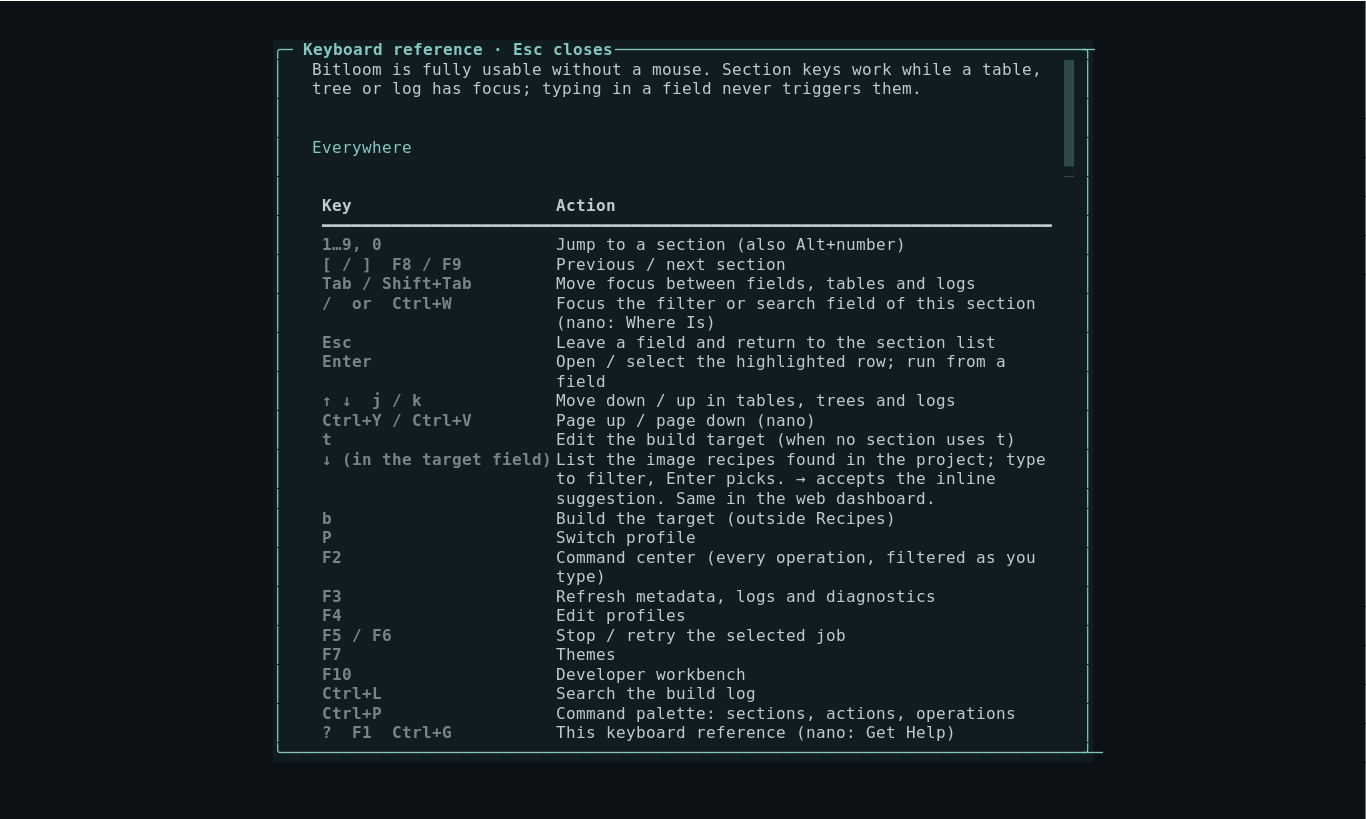
Bitloom is fully usable without a mouse; the keyboard reference lists every key and ? shows it inside the TUI.
- The top bar shows the profile, runtime, MACHINE, DISTRO, the detected Yocto release, the service connection and the clock; the brand shimmers while the service is building.
- The numbered navigator lists sections
1–0;[/]or F8/F9 cycle through them and the section's list receives focus. - Each section has single-letter actions, shown in the footer and in front of every button label (for example
sstop,rretry,eerrors only in Builds). Letters typed into a field never trigger them;/orCtrl+Wfocuses the section filter andEscreturns to the list. - Editors use nano keys:
^Owrite,^Xexit (asks before discarding changes),^Wsearch,^K/^Ucut and uncut lines,^Ghelp. - Status cards show the current job with a spinner, task and setscene counts, CPU/RAM with a CPU sparkline, and disk usage; the Build card flashes green or red when a job ends. The progress bar is indeterminate until BitBake reports task counts.
Pswitches profile,tedits the build target (several targets separated by spaces; Enter builds them;↓lists the image recipes found in the project,→accepts the inline suggestion),bbuilds, Ctrl+P lists sections, actions and all operations.
Screenshot Keyboard reference overlay
140 × 42 shows the complete workspace. Below 105 columns or 30 rows, tabs replace the navigator and side panes disappear; short terminals also hide the task monitor and overview. Below 75 columns or 22 rows, logs take priority over history and metrics; resize to restore those panels. Dialogs fit within the terminal and scroll when necessary. Layout tests cover 160 × 50, 120 × 36, 90 × 28, 80 × 24, 60 × 20 and 140 × 20, including restoration after resizing.
F5 opens interruption options and F6 retries the selected job. Controls occupy one terminal row. Below 105 columns, tabs replace the navigator and the main pane receives the full width. History stacks above logs so Stop and Retry remain accessible in compact terminals. The expandable layer tree groups metadata as layer → folder (recipes-core, classes-recipe…) → file, with counts; selecting a layer or folder narrows the table to it, selecting a file previews it. It includes inactive local metadata; evaluated BitBake commands remain authoritative. Recipe and kas files have a syntax-highlighted preview capped at 200 lines; Enter opens the complete editable file. The cockpit shows observed active BitBake tasks and persistent history alongside logs. Host CPU/RAM and workspace disk usage are sampled every two seconds; these are not container-specific measurements. Header MACHINE/DISTRO values come from explicit profile overrides or literal local.conf assignments; Resolve env remains authoritative for evaluated configuration.
Daily helpers#
Know when a build ends#
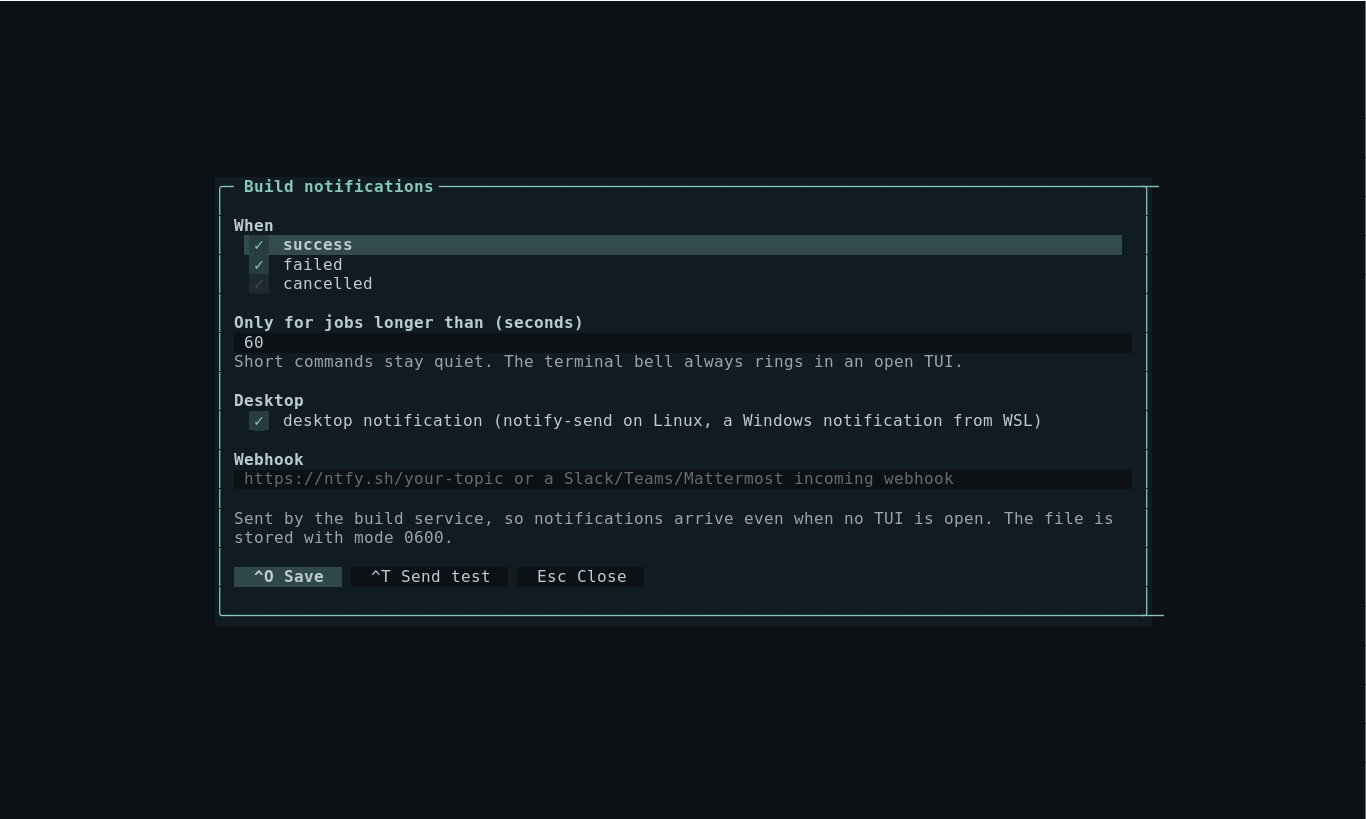
Configuration → o (or the Build notifications panel in the web Configuration section) chooses how the build service announces finished jobs:
- outcomes (success, failed, cancelled) and a minimum duration, so short commands stay quiet;
- a desktop notification:
notify-sendon Linux, a Windows notification when Bitloom runs in WSL; - a webhook: an ntfy topic (phone push, with high priority for failures), a Slack, Teams or Mattermost incoming webhook (
{"text": …}), or JSON with every job detail for your own tooling.
The service sends them, so they arrive even when no TUI or browser is open; an open TUI also rings the terminal bell. ^T sends a test. Settings live in <state>/notifications.json (mode 0600, as webhook URLs may be secret). In the web dashboard the bell button in the top bar additionally enables browser notifications for builds that end while the tab is in the background.
Screenshot Notification settings
How long is left#
While a build runs, the Tasks card and the web progress line show an ETA. It combines the current task rate (after enough tasks to be meaningful) with the median duration of the last successful runs of the same command in the same profile, and says which it used.
What changed since the last run#
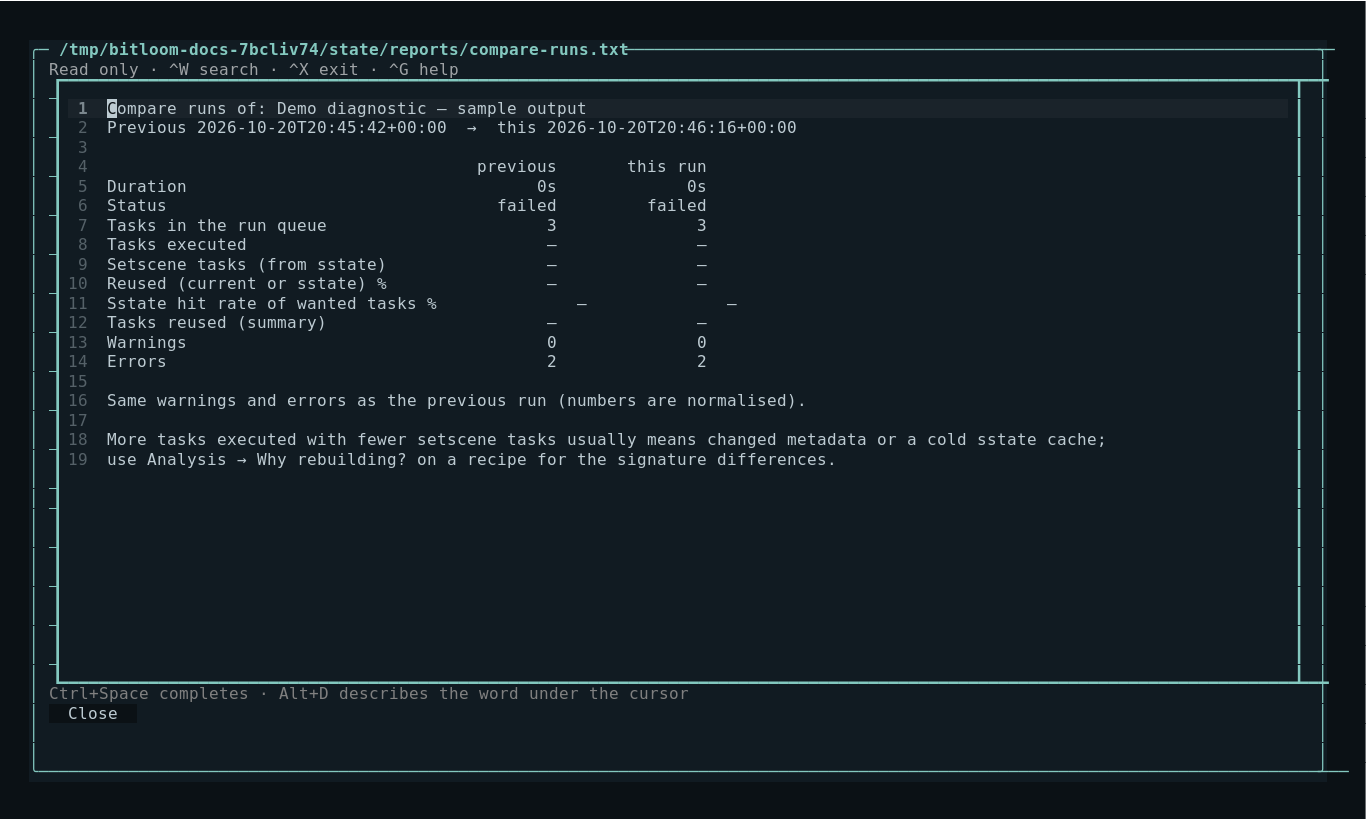
Builds → d (web: the Compare tab) compares the selected job with the previous run of the same command: duration, tasks executed against setscene tasks restored from sstate, sstate hit rate, reused tasks, warnings that are new or gone, and new errors. Numbers inside messages are normalised so the same warning with another version is not reported as new. Many more executed tasks with fewer setscene tasks point at changed metadata or a cold cache; Analysis → Why rebuilding? explains the signatures.
Screenshot Comparison with the previous run
What fills tmp/work#
Caches → w (web Configuration: tmp/work usage, CLI: bitloom --work-usage) measures each recipe's work directory (bounded to 30 seconds on huge trees), lists the largest, says whether rm_work is enabled and gives bitbake -c clean commands for the biggest. INHERIT += "rm_work" removes work directories after each recipe builds; keep recipes you debug with RM_WORK_EXCLUDE.
Errors and log search#
Failures generate a notification and refresh the task-log browser. Analysis → Failure diagnosis anchors on the root cause instead of the first line mentioning a failure: compiler errors, the first make *** line with the output leading to it, out-of-memory kills, full disks, fetch and patch failures and pseudo aborts. It lists the failed tasks and maps known causes to a next step, for example retrying a MakeMaker "Makefile has been rebuilt" race, pinning the peeled commit of an annotated kas tag, or bitbake -c clean <recipe> when a build interrupted by a restart left empty object files behind (undefined references to main). These rules come from failures seen on real Scarthgap and Wrynose builds. Builds → c opens console builds that were started outside Bitloom (details). Select a failed build in history and use Failed task log in Task logs to read paths explicitly reported by BitBake through the original runtime. This works with container-only paths too; at most ten logs are queued per click. Search selected logs case-insensitively with three surrounding lines, or toggle errors-only. Pause freezes live display while output continues to be written to disk; Resume reloads the captured tail. The live view keeps 5,000 lines; searches inspect the complete file and cap the rendered result. Export copies the original complete log to .bitloom/exports.
Task logs are discovered under the standard tmp/work/ARCH/RECIPE/VERSION/temp hierarchy and ordered by modification time. Custom TMPDIR layouts currently require setting build_dir to match the expected layout or opening logs externally. Symlink aliases are skipped to avoid duplicate entries.
The Workbench build report extracts warnings, errors, task summaries, failed tasks and shared-state summaries. Timings ranks completed tasks by durations observed in timestamped kas output. Overlapping tasks are not added into a false build duration. Plain BitBake logs without timestamps cannot supply those timings; use buildstats artifacts. It does not invent diagnoses. Use the task's own log to determine the cause.
Workbench#
Environment: Resolve env for the chosen target, wait for success, then Load. Filter both variable names and values. Capturing two environments for the same target/profile enables Env diff. Literal exported values are compared; function bodies and assignment provenance remain in the original log.
Dependencies: Generate graph for a target and wait for success. Choose Dependencies and Load to read task-depends.dot from the configured host-visible build directory. If the build directory is container-only, Load queues a read through the original runtime and parses its persisted output. Filter nodes to explore task relationships. The first 20,000 edges are indexed. Enter an exact node name in the filter and choose Why this task? to traverse required and reverse dependencies. Traversal detects cycles and limits each direction to 200 nodes.
Build history: Enable buildhistory and BUILDHISTORY_COMMIT in local.conf, build an image, then open Build history diff. The report shows recent Git commits and changes between the newest two commits.
Signatures: Use Dump signatures, Explain sstate differences, Read signature file or Compare signature files. Signature commands use BitBake tools from the selected release rather than decoding undocumented binary formats.
Root filesystem inspection#
Select a tar rootfs archive in Artifacts and use Rootfs inventory. The report lists file type, mode, numeric UID/GID, size and link targets. Archives are never extracted and links are never followed. The inventory is bounded to 20,000 entries. Other image formats require their own tooling.
Analysis reports#
Open Analysis in the navigator or tab bar, choose a report, and press Analyze. Export saves the displayed report under the state directory's exports folder.
- Search metadata: enter a literal phrase. Search is case-insensitive and covers indexed recipes, appends, classes, kas YAML and layer.conf, including inactive layers. Results contain paths and line numbers. Files above 2 MB or unreadable files are skipped; output stops at 1,000 matches. Container-only metadata must be made host-visible to be indexed.
- Compare manifests: enter before and after image manifest paths. Standard
package architecture versionrows and two-columnpackage versionrows are supported. Added/removed packages and changed versions are listed separately; architecture is part of identity. Conflicting versions and malformed rows are rejected. Each manifest is limited to 100,000 lines. Paths refer to host-visible files, including copied container artifacts. - Sstate efficiency: leave the first path blank to use the selected build log, or enter another log path. The report reads actual Sstate summary counts and computes hit rate for wanted tasks and coverage including current tasks. A zero denominator or missing count is shown as unavailable. This does not establish which cache objects are safe to remove.
- Warning groups: select or enter a build log. Identical messages are counted after removing the timestamp/logger prefix; the 200 most frequent groups are shown. Different recipe paths and message text remain distinct.
Metadata, manifest, efficiency and warning reports read persisted data from the selected paths. Runtime tools below also provide explicit editing and artifact export.
Cache and download maintenance#
Scan either Downloads or Shared state to view names, size, age and relative paths. Inventory is capped at 20,000 files. The scan total is the indexed total, not necessarily the entire cache. Set an age of at least one day and open Prune plan. It lists concrete files and estimated bytes; nothing is removed before Execute plan.
Pruning excludes symlinks, .lock/.done markers, Git checkout internals and files whose sibling lock exists. Each file's path, size, modification time and sibling lock are checked again at deletion. Only files inside the selected root can be deleted. The TUI refuses a plan while its own jobs are active/queued. Other machines/builders cannot be detected.
Age is not proof that an artifact is unused. Keep shared caches and offline source requirements in mind. Recipe clean keeps downloads/sstate; cleansstate removes local recipe shared state; cleanall also deletes recipe downloads. Remote sstate mirrors are unaffected by local inventory pruning.
Download audit reports possible partial files, lock files and orphan completion markers. For actual source integrity checking, use the recipe fetch task and its SRC_URI checksums.
Releases and compatibility#
Versions reports local repository branches, commit IDs, Git descriptions, dirty status and literal LAYERSERIES_COMPAT declarations against locally detected LAYERSERIES_CORENAMES. Dynamic expressions can require manual review. Metadata parse is authoritative.
Use one profile/build directory per release. The TUI does not switch active Git branches underneath a running build, silently migrate local.conf syntax or mix caches without your configuration.
Configuration editing#
local.conf, bblayers.conf and metadata are editable. Save creates a timestamped backup, refuses to overwrite a file changed externally, and atomically replaces the contents. Files above 2 MB and binary files are not opened in the editor. Close without saving discards in-editor changes. Review changes with your usual Git tooling.
Example snippets cover buildhistory/buildstats, mirrors, shared caches, offline builds, mirror tarballs, thread limits and optional image/security classes.
The editors (Recipes o, runtime files, New file) include the BitBake assistant: Ctrl+Space completes from the project's layers, Alt+D describes the word under the cursor, and the line under the editor lists the problems as you type.
Troubleshooting#
- bitbake not found: configure an init script or launch from a sourced environment.
- kas or kas-container not found: the build service keeps the
PATHof the shell that started it, plus thebindirectory of Bitloom's own Python environment. Install kas in that environment or on the systemPATH, then restart the service when idle (bitloom --service-stop). bitloom: …profiles.json is not valid JSON(or another profiles error): the message names the file and the problem. Fix it, or move it away: the next start opens the guided setup. An empty file counts as a first start; without"active"the first profile is used.history.sqlite3 cannot be used: the build history database is damaged (for example after a disk full). Move it away to start a new history; logs under<state>/logsremain.security-reviews.jsonreported as damaged: CRA readiness and Vulnerabilities show the problem instead of the reviews, and recording a review is refused, so the file is never overwritten. Fix the JSON (an object ofpackage/CVEentries) or move it away.do_sbom_cve_checkcannot find…rootfs-<timestamp>.spdx.json: a stale image SBOM; see SBOM, CRA and releases.- Docker permission denied: the user running Bitloom must have permission to the Docker socket; the app never changes daemon permissions.
- Docker Snap and /tmp: Snap's daemon can see a different
/tmpfrom the host. A bind mount may be created as root in the daemon namespace. Prefer a dedicated Linux directory visible to both namespaces, or initialize only the dedicated mount ownership inside a container. Never apply broad permissions to Docker or the project root. - Windows/NTFS build paths: store Yocto work directories on a Linux filesystem. The TUI source can live under /mnt/c; BitBake source/build caches should not rely on NTFS semantics.
- kas custom machine override: use KAS_MACHINE/KAS_DISTRO or kas YAML; arbitrary environment variables may not be forwarded by the wrapper.
- Stop left an external build running: wrapper/pre-existing-container modes cannot guarantee server termination. Verify processes in that runtime before recovery.
- Missing task/class: check your release and INHERIT configuration. CVE, SPDX, testimage and ptest entry points require appropriate metadata.
- Too little space/RAM: check Health, reduce thread counts, and inspect cache plans before removal.
- Small terminal: use keyboard shortcuts and Tab, or increase to 140×42 for the complete layout.
Practical limits#
Each command remains subject to the selected Yocto release, runtime, device access and configuration. Inventory scans are bounded, age-based pruning does not perform signature reachability analysis, and no cache is pruned automatically. External builders sharing a cache cannot be detected reliably. Logs and profiles can contain proprietary paths or credentials; review exports before sharing them. Custom commands accept argv, not shell expressions. Unit and UI tests in CI do not run a Yocto build; the container integration builds are separate, opt-in validations (see validation).
Documentation and verification#
pip install -e '.[dev]'
python -m pytest -q                      # unit and UI tests, no Yocto build needed
pip install pillow cairosvg playwright   # optional capture tooling
python tools/capture_docs.py             # TUI screenshots and GIFs
python tools/capture_web.py              # web dashboard (Playwright with Chromium)
python tools/generate_reference.py       # commands.md and keyboard.md from the code
python tools/serve_docs.py --port 8000   # rebuild the HTML and serve docs/
python tools/check_docs.py               # links, anchors and page behaviour
The Pages workflow publishes docs/ on pushes to main when the repository has Settings → Pages → Source → GitHub Actions (private repositories need a plan that includes Pages); otherwise the run is skipped with a notice.
python tools/capture_docs.py captures the real Textual interface with Pilot and exports SVG/PNG/GIF. It uses labelled demo data. python tools/validate_kas.py executes a real image build through Runner and records a JSON result. Read validation.md for evidence from the current development session.
Persistent build service and reconnecting#
Real launches now use an independent local build service by default. Closing the TUI, pressing Ctrl+Q, or losing the terminal detaches the client: queued and running jobs remain owned by the service. Reopen Bitloom with the same --state directory to reconnect. Jobs retain their original profile, commands and complete logs. Multiple clients can observe the same service.
bitloom --config .bitloom/profiles.json --state .bitloom
bitloom --state .bitloom --service-status
bitloom --state .bitloom --service-stop  # idle service only
bitloom --embedded                     # exit stops owned jobs
Demo mode remains embedded. F5 still explicitly interrupts a selected job through the service. The service refuses an idle-stop request when jobs remain queued/running; use F5 first if interruption is intended. A Unix socket in a private Linux /tmp/bitloom-services-UID directory works even when the project lives on a WSL Windows mount. Connections are restricted to the same UID. History remains under the selected state directory. This is local persistence, not reboot recovery or a distributed scheduler: a crashed service marks incomplete history interrupted on its next start and does not automatically replay work.
Runtime filesystem and artifacts#
The Analysis selector now provides Runtime directory, Runtime file, Edit runtime file and Export runtime artifact. Enter an absolute path as seen by the selected runtime, such as /work/build/conf/local.conf in kas-container. These operations run Python inside that runtime through the same command routing as builds. Python 3 must exist there.
Directory previews stop at 2,000 entries; text previews/edits at 2 MiB. Runtime editing opens an actual editor, rejects files changed since the preview, refuses symlink edits, preserves the original file in a content-addressed backup and replaces the file atomically. Saving is blocked while this client's build queue is active. External programs remain responsible for their own edits.
Binary export streams a file up to 1 GiB into a temporary local file and verifies both SHA-256 and byte count before committing it. The second path is the local destination; leaving it blank uses the state's exports directory. Existing destinations are never overwritten. This handles artifacts visible only inside the container, including a Docker Snap daemon's private filesystem. It does not require mounting or extracting an image.
Evidence workflows#
| Analysis choice | Input and result |
|---|---|
| Why rebuilding? | Enter one recipe; queue release-native bitbake -S printdiff and evaluated environment. Analyze again after completion to link the stored explanation, the two newest available sigdata files per task/work variant, release-native signature comparisons and referenced variable values. The chosen signature timestamps must match your intended before/after states. Use F2 to capture a fresh printdiff; a matching cache can legitimately report no difference. |
| Failure diagnosis | Select a build log or enter a runtime task log path. Classify fetch/patch/compile/QA/rootfs evidence and show the first diagnostic with context and reported task-log paths. Suggestions are troubleshooting steps, not automatic fixes. |
| Package provenance | Set the top target field to an image recipe and enter a package or absolute installed file path. Evaluate the image, read runtime pkgdata, map files to packages/recipes and show a shortest path from PACKAGE_INSTALL/IMAGE_INSTALL through runtime dependencies. |
| Build preflight | Enter a runtime build directory or leave blank. Check writable parent, disk headroom, free inodes and configuration presence in the actual filesystem. BLOCK and WARN are distinct; this advisory report does not intercept queued commands. |
| Devtool review | Enter the runtime source Git directory. Review status, uncommitted diff, commits and patch text before using build/deploy/finish/reset from F2. It does not calculate the release-specific final patch transfer set. |
| Capture snapshot | Record runtime configurations, repository commits/dirty state, image manifests, artifact sizes and package file sizes into JSON. If a log is selected, include its measured warning, timing and sstate reports; select the correct build log yourself. |
| Compare snapshots | Enter before and after JSON paths. Compare configuration diffs, layer commits, package manifests, package/artifact sizes and recorded metrics. Unavailable metrics remain absent; a snapshot records capture time state, not an automatically reconstructed historic build. |
| Reproducibility bundle | Export a reference JSON bundle with original profile, runtime snapshot, available kas configurations and resolved cached container image digests. Dirty sources require a separate patch export; this is not a self-contained source archive or one-command replay. |
| Cache reference plan | Enter host-visible or runtime cache and stamps directories. Index 64-character signature hashes and classify files as referenced or unproven. No deletion follows from a missing reference. |
Package inclusion follows both RDEPENDS and RRECOMMENDS. Virtual providers, renaming, package-manager choices, exclusions and optional recommendations can complicate the chain; absent evidence is explicitly not proof of absence. The evaluated image operation requires an idle queue. Mirror reachability and layer compatibility are not proven by filesystem preflight; use BitBake metadata parsing, layer inspection and fetch actions.
Reproducibility exports redact credential-named configuration lines and URL userinfo. Profile environment uses a small build-control allowlist; unknown keys and custom container arguments are omitted. Supply those separately. Inspect any bundle before sharing because project-specific secrets embedded under innocuous configuration names cannot be recognized reliably. An unresolved container tag is explicitly reported and is not treated as an exact digest.
Coordinating shared caches#
Bitloom builders take a shared .bitloom-coordination.lock on host-visible download and sstate directories. Maintenance takes an exclusive lock, so cooperating services cannot prune while another Bitloom builder uses the cache. A separate build-directory lease prevents duplicate builders across local state directories. Existing .lock and .done protection also applies when executing a plan directly.
These are advisory locks. External BitBake processes, container-only cache paths and builders that do not take the same lock are not coordinated. Signature reference plans are conservative: one build's stamps are not an exhaustive record of every cache user. For release-specific removal, coordinate all builders and use that release's scripts/sstate-cache-management.sh after inspecting its own help/options. Bitloom does not infer reachability from age or silently invoke a destructive cache script.
Terminal themes#
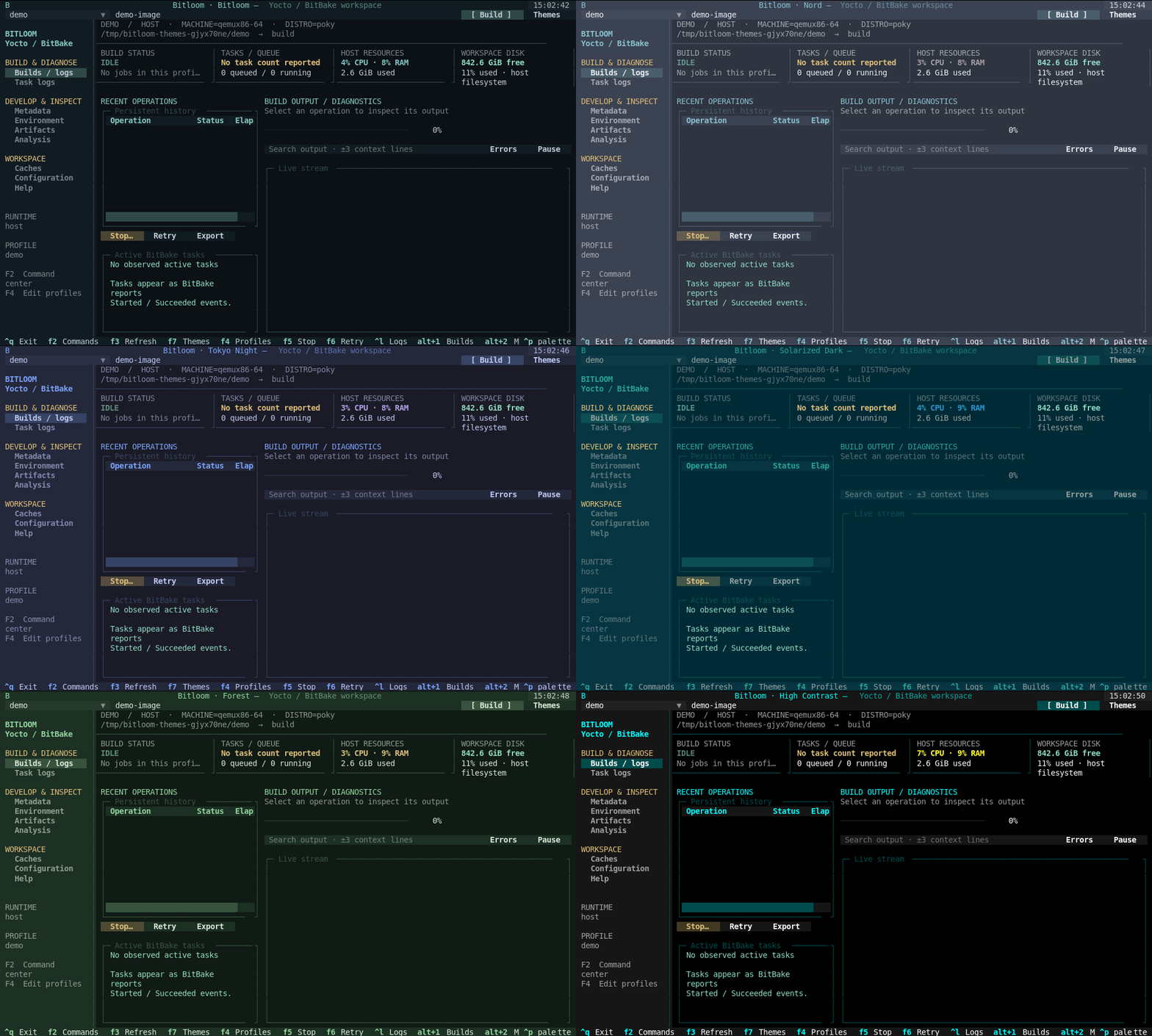
Press F7 or the toolbar's Themes button. Choose a palette to preview it immediately, then Save theme to persist it or Cancel/Escape to restore the palette you opened with. Changes affect terminal backgrounds, surfaces, tables, selection colors, modal dialogs and semantic status colors. Source previews use a matching light/dark syntax palette on their next refresh.
| Theme | Character |
|---|---|
| Bitloom | Original dark terminal palette with mint and blue |
| Soft Slate | Muted dark gray with gentle sage accents |
| Linen | Warm light background with subdued colors |
| Ubuntu | The Ubuntu terminal: aubergine with orange |
| Monokai | The classic editor palette: olive-black with lime, cyan and pink |
| Darcula | The JetBrains dark theme: graphite with orange and blue |
| Nord | Cool slate and arctic cyan |
| Dracula | Charcoal, violet and cyan |
| Tokyo Night | Deep blue with lavender |
| Catppuccin Mocha | Soft dark violet and blue |
| Gruvbox | Warm charcoal with olive and gold |
| Solarized Dark | Deep teal with blue accents |
| Ocean | Navy with bright aqua |
| Forest | Dark green with sage accents |
| Ember | Warm brown with amber and coral |
| Paper | Light paper background with dark text |
| Catppuccin Latte | Light lavender-grey with violet and blue |
| Solarized Light | Warm cream with teal and blue |
| High Contrast | Black background with bright white, cyan and yellow |
The web dashboard has the same palettes in its theme menu (the round button in the top bar); see Web dashboard.
The choice is a UI preference stored in appearance.json under the selected state directory, independent of build profiles. Missing, malformed or unknown saved themes fall back to Bitloom. Themes do not change build settings or stop queued work.
Animation Fourteen actual terminal theme previews
Build, launch and try the local Yocto workspace#
Run these commands from the repository root in a Linux/WSL terminal. Bitloom is a Python application: editable installation is sufficient for development; no native compilation is required.
Install for development#
python3 -m venv .venv
source .venv/bin/activate
python -m pip install -e '.[dev]'
bitloom --help
bitloom --demo
If themes appear monochrome and your shell sets NO_COLOR, run unset NO_COLOR before launching.
In this prepared workspace, .venv and kas-container already exist. You can start directly with source .venv/bin/activate.
Build distributable packages#
source .venv/bin/activate
python -m pip install 'setuptools>=61' build wheel
python -m build --no-isolation
Outputs are dist/bitloom-0.1.0-py3-none-any.whl and dist/bitloom-0.1.0.tar.gz. The distribution and executable are both named bitloom. The source archive includes the English manuals, Pages assets, examples and integration tools. To install the wheel into another environment:
python3 -m venv /tmp/bitloom-wheel
/tmp/bitloom-wheel/bin/python -m pip install dist/bitloom-0.1.0-py3-none-any.whl
/tmp/bitloom-wheel/bin/bitloom --help
Open the already built local test workspace#
The verified local workspace uses Poky yocto-5.0.8 / Scarthgap, qemux86-64, core-image-minimal and a pinned kas container image. Yocto tools execute inside Docker; the host runs only the TUI and container wrapper. .validation is local generated state and is intentionally absent from a fresh Git clone.
source .venv/bin/activate
python tools/prepare_validation.py
bitloom --config .validation/profiles.json --state .validation
A recorded result is historical evidence: temporary work mounts can be removed. Check /work/build through the runtime before relying on it; if absent, prepare a new workspace with python tools/validate_developer.py --build and launch .developer-validation/profiles.json as explained in the testbook.
The helper recreates the test profile from .validation/result.json when available. It preserves history and other profiles, uses the recorded workspace and does not build anything. The actual work directory is recorded in .validation/result.json; with Docker Snap, its contents are in the daemon's namespace and may appear empty on the host. In the container, the build directory is /work/build. Use Analysis runtime tools to browse it.
- Keep
core-image-minimalin the top target field and press Build for an incremental image build. Existing matching task outputs are reused. - Select its history row to follow the complete log. F2 opens recipe tasks, fetch, SDK, layers and devtool actions; change the target to
busyboxto inspect or build one recipe. - In Analysis, choose Build preflight and enter
/work/build. For Package provenance, set the top target back tocore-image-minimaland enter/bin/sh; the verified inclusion chain ispackagegroup-core-boot → busybox. - Try Runtime directory with
/work/build/tmp/deploy/images/qemux86-64, or Capture snapshot with/work/build. F7 previews and saves a theme. - Ctrl+Q detaches while the service continues. Launch the same command again to reconnect. F5 opens explicit interruption choices; choose Let finish if you want the build to complete.
bitloom --state .validation --service-status
bitloom --state .validation --service-stop
The last command stops an idle service only. Stop it before running integration scripts that need exclusive access to .validation; closing the TUI alone does not stop the service.
Reproduce on a fresh machine#
Docker must be available and the build work directory must be on a Linux filesystem. Install the official wrapper if needed:
source .venv/bin/activate
curl -fL https://raw.githubusercontent.com/siemens/kas/4.8.1/kas-container -o .venv/bin/kas-container
chmod +x .venv/bin/kas-container
python tools/prepare_validation.py --work /tmp/bitloom-kas-validation --engine docker
bitloom --config .validation/profiles.json --state .validation
Press Build to initialize and build the image. The first build downloads repositories/sources and needs substantially more time and disk than the verified incremental run. The helper does not repair container mount permissions: if Docker Snap creates the dedicated mount as root, follow the runtime troubleshooting guide.
For scripted verification, with the service stopped:
python tools/validate_kas.py --work /tmp/bitloom-kas-validation --engine docker
python tools/prepare_validation.py
python tools/probe_kas.py
python tools/probe_workflows.py
validate_kas.py builds the image and verifies its rootfs; probes then exercise real runtime operations. probe_workflows.py submits a warm build to a separate persistent service and stops that service after completion. Unit/UI checks run with python -m pytest -q; they do not require a Yocto build.
Preview the Pages site locally#
python -m pip install '.[docs]'
python tools/serve_docs.py --port 8000          # rebuilds the HTML, then serves docs/
python tools/serve_docs.py --port 9000 --no-build --open
--host changes the bind address (loopback by default). Screenshots in the HTML pages are collapsed and load only when expanded.
Gentle colors and focus#
F7 offers Soft Slate, a muted dark gray palette, and Linen, a warm light palette. Focusing report or log panes highlights the border without tinting the entire background. If a true-color terminal such as Windows Terminal renders saturated blue blocks, check TERM and COLORTERM and try COLORTERM=truecolor bitloom with your usual profile arguments. Limited-color terminals still use their available colors.
Navigation and elapsed time#
F8 selects the previous workspace section; F9 selects the next, including Developer, Analysis and Help. F10 opens Developer directly. These keys work with conventional terminal escape sequences. Alt+number bindings remain available on terminals sending compatible key events, but are not the recommended navigation keys. Running history rows update their elapsed time once per second, independently of log output; finished durations remain fixed.
Hands-on kas: layers and recipes#
Start the verified workspace with python tools/prepare_validation.py, then bitloom --config .validation/profiles.json --state .validation. Docker must be running. Use F2 to open commands and F8/F9 to change sections.
First build busybox, repeat the build, run Clean recipe, and build again. Compare executed and reused tasks. Clean recipe + sstate removes the recipe's local shared state too; mirrors can still supply cached results. Build core-image-minimal afterward to inspect image assembly.
Create a layer and a small recipe#
From F2, open Open kas shell. The following commands run inside the container, with the BitBake environment initialized. /work/meta-bitloom persists in this profile's dedicated work mount.
bitbake-layers create-layer /work/meta-bitloom
mkdir -p /work/meta-bitloom/recipes-example/bitloom-hello
cat > /work/meta-bitloom/recipes-example/bitloom-hello/bitloom-hello_1.0.bb <<'EOF'
SUMMARY = "Bitloom learning example"
LICENSE = "CLOSED"
S = "${WORKDIR}"
do_install() {
    install -d ${D}${bindir}
    printf '#!/bin/sh\necho "Hello from Bitloom v1"\n' > ${D}${bindir}/bitloom-hello
    chmod 0755 ${D}${bindir}/bitloom-hello
}
EOF
exit
CLOSED is used for this private exercise to avoid needing a separate license file; use the actual license and checksum for distributable recipes. Layer creation and registration are separate operations. F2 also provides Create layer and Add layer, but a layer registered only in bblayers.conf may be lost when kas regenerates configuration.
Register the layer reproducibly#
Create kas-experiment.yml at the root of the Bitloom checkout, using your host editor:
header:
  version: 14
  includes:
    - tests/integration/kas-minimal.yml
repos:
  experiment:
    path: /work/meta-bitloom
local_conf_header:
  bitloom-experiment: |
    IMAGE_INSTALL:append = " bitloom-hello"
This absolute layer path intentionally targets the container workspace above. In F4 duplicate the kas integration profile, retaining its container environment and KAS_WORK_DIR, and set kas_file to kas-experiment.yml. Run kas build to apply the configuration. The local layer is declared in kas rather than only in a generated configuration file. Do not commit kas-experiment.yml until you decide whether this container-specific configuration belongs in your project.
Build target bitloom-hello, then build core-image-minimal and inspect its package manifest for bitloom-hello. To edit the recipe, use the Analysis runtime file reader/editor on /work/meta-bitloom/recipes-example/bitloom-hello/bitloom-hello_1.0.bb, or open the kas shell and use an available editor. Change the greeting to v2 and rebuild the recipe and image. BitBake should detect the metadata change; a clean is usually unnecessary.
Extend an existing recipe#
Keep upstream recipes intact and add a matching .bbappend in your layer. For example, create recipes-core/busybox/busybox_%.bbappend containing:
SUMMARY:append = " (Bitloom experiment)"
Evaluate BusyBox's environment and inspect SUMMARY to verify the append. For source development use Modify recipe (devtool modify), edit the extracted source directory reported by devtool, then Devtool build. Commit source changes before Devtool finish into /work/meta-bitloom; that exports the recipe changes/patches to your layer. Devtool reset removes workspace integration when you want to return to the layer recipe. Source files may remain, so inspect them before removing anything.
References: Yocto layers, kas configuration.
Create files and refresh external changes#
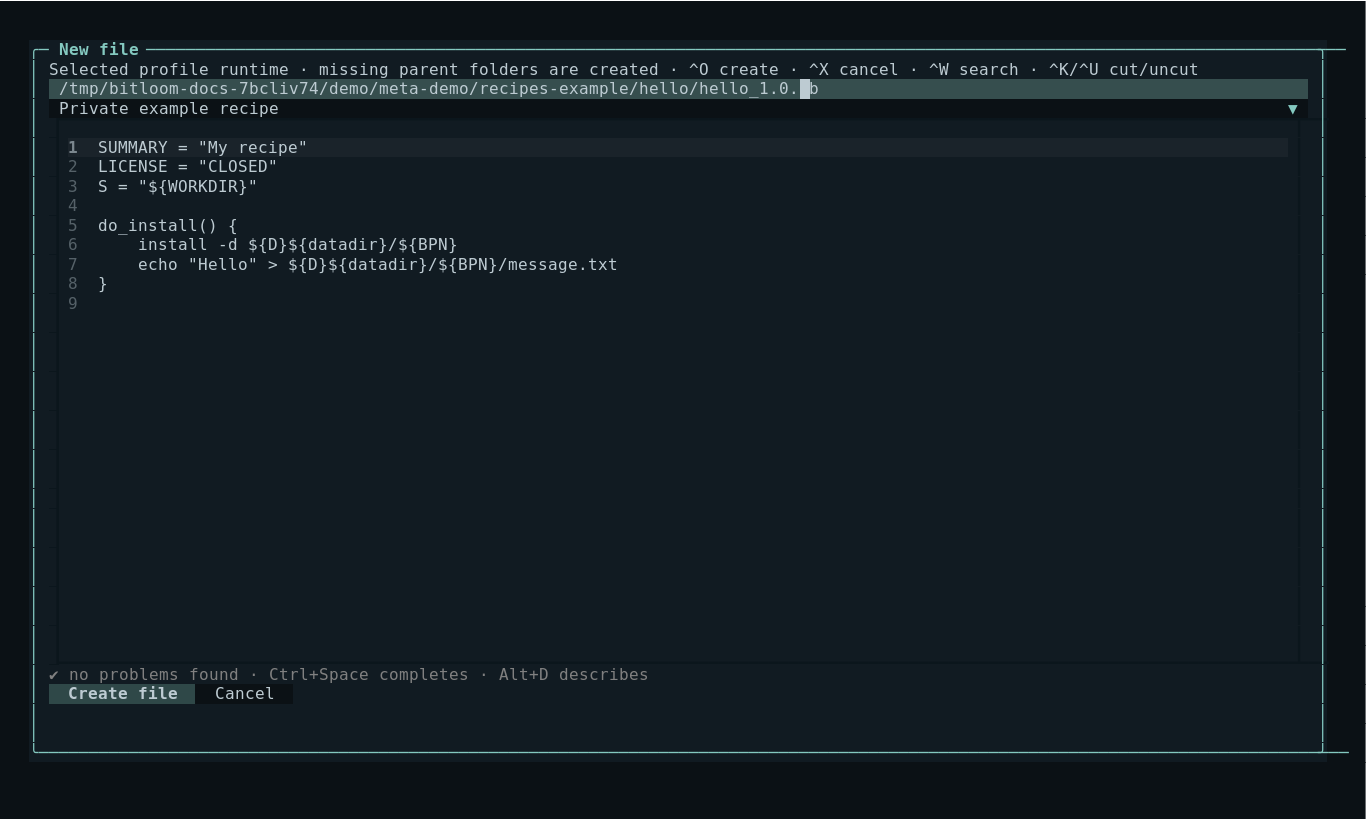
Metadata's New file button and Analysis's Create runtime file operation open an editor with an absolute destination path and templates for empty text, private example recipes and .bbappend files. Select the template before entering your content. Create file creates missing parent folders and atomically publishes the file without overwriting existing files or symlinks. Builds queued or running in this session must finish before metadata creation or editing.
With kas/container profiles use runtime paths, for example /work/meta-bitloom/recipes-example/hello/hello_1.0.bb. The directory is shown in Analysis after creation. Local metadata remains a host filesystem index; container-only files are viewed through runtime directory/file operations. Host metadata additions, edits and deletions are detected every five seconds and refresh the index when changed. Open runtime directory listings refresh every fifteen seconds while idle, with a 2,000-entry limit. Dialogs pause automatic scans. F3 rescans local metadata; Analyze refreshes the current runtime directory immediately.
To follow the hands-on tutorial entirely through Bitloom: use F2 Create layer for /work/meta-bitloom, then New file to create the .bb recipe and any .bbappend files. Create the kas experiment YAML in the host checkout using your editor, since a container profile's file dialog targets the container filesystem. Register the layer in kas as described above. Existing container files can be edited through Analysis → Edit runtime file.
Screenshot New-file editor with sample recipe
Connected Developer workflows#
F10 opens the Developer workbench. Its guide documents all sixteen views, field meanings, queued operations, stale-file detection, immutable captures and baseline comparison. New layer previews complete CMake/Meson/Make/Python/Rust fixtures and registers them through a new kas composition or bitbake-layers. Clone, also in F4, preserves the original profile and selects a separate build directory. Optional source_mappings maps absolute runtime roots to real host-visible directories for IDE exports.
New owned kas-container jobs have unique Docker/Podman names and labels. Force stop records the exact container's stop result before recipe recovery is offered. Graceful draining remains disabled for kas wrappers; native kas and external containers retain unconfirmed-server guards. Shutdown evidence displays the original job observations separately from a fresh probe namespace.
After upgrading, let an existing persistent service finish its queue and stop that idle service once; the next launch loads the new code. Existing history is retained. The Developer acceptance cases give concrete experiments for every workflow, including optional hardware, kernel and SDK prerequisites.